
What Is Device Fingerprinting And How Does It Work?
In today’s increasingly digitalised world, every device is bound to leave behind a unique mark – a digital fingerprint that sets it apart from other devices.
Imagine a virtual world where your device's every configuration, quirk, and quiver of activity serve to create a unique signature. It is essentially a fingerprint that speaks volumes about you without uttering a word.
What Is Device Fingerprinting?

Device fingerprinting is a method used to identify and track unique devices, such as computers, smartphones, and tablets, based on a combination of software and hardware.
This identification process basically creates a "fingerprint" for each device — which can be used for security, fraud detection, and targeted advertising. It can also be implemented with other tracking techniques to build a comprehensive digital profile of a device's online activities.
Device fingerprinting has shown to be a more reliable form of identifying and tracking devices online. This practice was conceived as an improvement to cookies because cookies can be easily removed or deleted from a browser.
A cookie is a piece of data from a website that is stored within a user’s web browser that the website can retrieve at a later time. They help that website remember information about your visit
 Image retrieved from: https://analyticsdemystified.com/general/cookies-demystified/
Device fingerprinting is the next best alternative in providing a more consistent way of tracking a user’s online activities since they are less likely to change operating systems or fiddle with their IP addresses.
What Are The Components of Device Fingerprinting:
There are three criteria required to determine a device’s ‘fingerprint’ profile.
<li><strong>Device Attributes</strong>: Various characteristics of a device are collected to create a fingerprint. Attributes include the device's operating system, browser type, screen resolution, time zone, language settings, installed fonts, and more.</li>

<li><strong>Network Information</strong>: The device's IP address, network type, and other network-related details are often included in the fingerprint.</li>

<li><strong>Behavioural Patterns</strong>: How a device interacts with websites, including click patterns, navigation behaviour, and the order in which resources are requested, can also contribute to the fingerprint.</li>
How Does Device Fingerprinting Work?
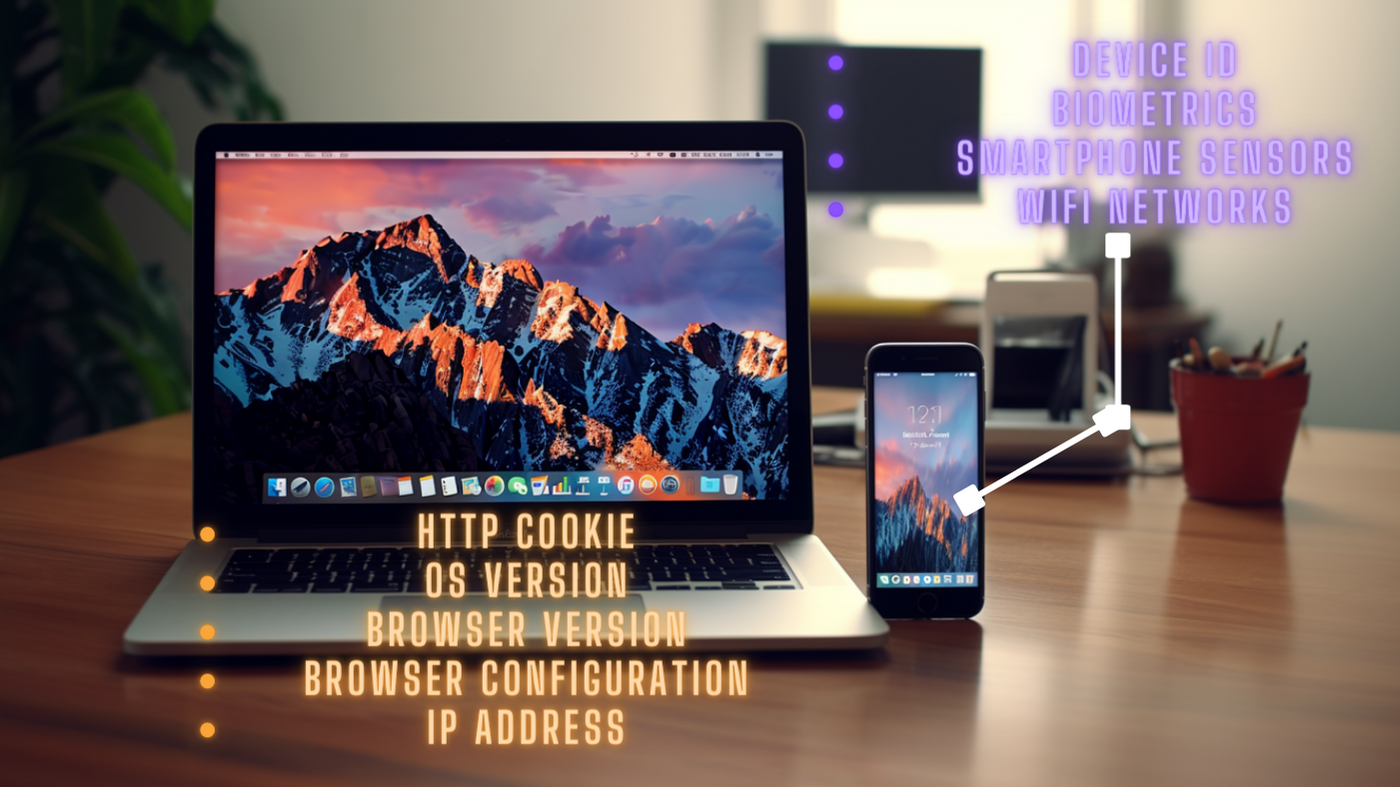
Device fingerprinting involves a series of 3 steps that serve to gather information on a user’s device to compile a unique profile out of it towards the end.
<li><strong>Collection of Information</strong>: Information is collected on a device when it connects to a network or visits a website. This can include:
<li><strong>User-Agent String</strong>: This is a string of text that includes details about the device's operating system, browser, and version.</li>

<li><strong>IP Address</strong>: The unique numerical address assigned to a device on the internet.</li>

<li><strong>Screen Resolution and Colour Depth</strong>: Display capabilities of the device.</li>

<li><strong>Time Zone</strong>: Time zone setting of the device.</li>

<li><strong>Installed Fonts</strong>: The list of fonts installed on the device.</li>

<li><strong>Browser Plugins</strong>: Information about browser plugins and extensions installed on the device.</li>

<li><strong>Language Preferences</strong>: The preferred language of the device.</li>

<li><strong>Hardware and Software Characteristics</strong>: Details about the device's hardware, such as CPU type and number of cores, as well as software settings.</li>

<li><strong>Cookies and Local Storage</strong>: Information stored by websites on the device's browser.</li>
<li><strong>Fingerprint Generation</strong>: The collected information is then processed and combined to create a unique profile or "fingerprint" for the device. This fingerprint is a representation of the device's unique characteristics.</li>

<li><strong>Comparison and Tracking</strong>: The generated fingerprint is then compared to a database of known fingerprints. The device is recognised when a match is found and its behaviour can be tracked over time. If the fingerprint is not found, a new entry can be created in the database.</li>
What Are The Applications Of Device Fingerprinting?

<li><strong>Security and Fraud Detection</strong>: It can be used to detect fraudulent activities, such as account takeovers or payment fraud. Security alerts will be triggered when a device’s fingerprint is found to be associated with highly suspicious behaviour.</li>

<li><strong>Ad Targeting</strong>: Marketers can use device fingerprinting to deliver targeted ads to specific devices based on the device owners’ browsing habits and preferences.</li>

<li><strong>User Authentication</strong>: Device fingerprints can be used as an additional factor for user authentication. It adds an extra layer of security by forming a digital profile for companies to assess at their own convenience.</li>

<li><strong>Anomaly Detection</strong>: It can be used to detect anomalies in user behaviour — such as sudden changes in location or usage patterns.</li>
Bottom Line
It's important to note that while device fingerprinting can be a powerful tool, it also raises several privacy concerns. It can potentially be used to track users without their explicit consent. This is because the information gathered for device fingerprinting is automatically passed anytime a website is loaded within a browser.
In the past year, Apple, Google, and others have announced their plans to tone down on device fingerprinting practices within their respective browsers. Apple is concealing aggregated data for fingerprinting to make it more difficult for companies to exploit this data for device identification, while still allowing sufficient information to load websites correctly.
Meanwhile, Mozilla is using a third-party list to identify specific companies known to be engaged in fingerprinting practices. These listed companies are then blocked from accessing the data.
Despite these strides made by companies to limit the harm of device fingerprinting practices, there are ongoing discussions around the ethical and legal use of this technique.
TrustDecision is a leading provider of device fingerprinting solutions designed to strike the right balance between device identification and user privacy. At TrustDecision, they seek to prioritise transparency, consent, and best practices to ensure a safe and comfortable digital landscape for all internet users.
To learn more about how their solutions are able to navigate between the fine line of security and user consent — read their article here
Related articles
Spotting Fake IDs: How Hologram Tech Keeps Online Sign-Ups Safe

Fraud Prevention Best Practices: Staying Ahead in the Digital Age
Fraud has evolved into one of the most pressing challenges for businesses in the digital age, specifically in industries where trust and identity verification are critical, such as banking, insurance, telecommunications, and e-commerce. Fraudsters are after one thing, and one thing only: your perso

Fraud Prevention in the Digital Age: How AI is Transforming the Fight Against Scams
The onset of the digital age has ushered in remarkable innovations that we never would have thought possible a decade ago. Everything, from the way we work to the way we live our daily lives, has been drastically streamlined by technological advances. However, this progress comes with a double edge