
3 Methods to Read/Scan Photo ID
Customers need ot provide an ID (Identity Document) for any sign-up, enrolment, or onboarding process when conducting high-value, risky transactions. In the past, this is a manual process conducted by bank tellers, customer service personnel or admin staff. However, consumer trends have now shifted to digitally-enabled customer onboarding, and companies need to adapt.
Companies now need to find an automated way to read IDs remotely, be it a national ID card, passport, visa, or driver’s license. When correctly implemented, it leads to positive outcomes such as:
<li>Eliminate, or at least minimise data entry error</li>

<li>Prevent ID fraud</li>

<li>Speed-up process (from minutes to just seconds)</li>
Each country takes a unique approach to extracting data from IDs. Some ID cards contain a chip, while others have machine-readable code printed onto the card. Most are simply a card printed with readable characters. This article explores these 3 methods to read/scan an ID card as part of the digital customer experience.
1. Contact Smart Card Reading
It’s easy to discern if an ID card is a smart card. It has a visible chip, such as the Swedish national ID card shown below.
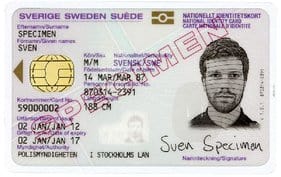
Specimen Obtained from Wikipedia
Other countries and regions adopting contact chips for ID cards are EEA (European Economic Area), Malaysia (MyKad) , Thailand, Hong Kong, UAE, Mongolia, and Pakistan (SNIC) .
Reading of contact smart card/chip requires a smart card reader connected to the operating system platform of your choice – e.g. Windows, Android, iOS. The smart card reader, on its own, is not able to scan information stored in any ID chip. You will need specialised software to support the specific ID chip reading in order to retrieve the required data from a smart card-enabled ID correctly. Typically, what’s going on within the ID chip reader software is a set of APDU command messages. Every ID may store data in a different structure.
The chip will usually contain a lot more information than what’s printed on the physical card surface. Besides additional biography details, an ID chip will also contain the ID bearer’s photo and even biometric data such as fingerprint minutiae. This information is also widely used in a passport.
2. Contactless Smart Card Reading
This has the same concept as a contact chip, but the contactless smart card doesn’t have a gold-plated chip visible on the card surface. Instead, it contains an embedded IC connectable through radio waves. Visa payWave and MasterCard PayPass are the 2 common examples of contactless smart cards.
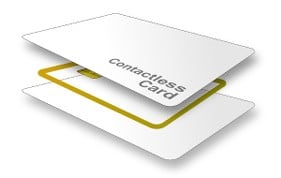
As for ID cards, the Second-generation Resident Identity Card in People’s Republic of China contains a contactless smart card. Indonesia’s e-KTP is another example.
To check whether an ID card contains a contactless chip, you can:
<li>Install the NFC reader app into your NFC-supported smartphone,</li>

<li>Turn on NFC, and</li>

<li>Try tapping the card on the back of your smartphone.</li>

<li>If your smartphone beeps, it indicates that a contactless chip is detected.</li>
To read a contactless smart card, a contactless reader (sometimes also referred to as NFC reader) will be required, along with software that supports deciphering the specific ID card chip data.
3. OCR (Optical Character Recognition)
When an ID card or document has neither a contact nor a contactless smart card, your best bet is OCR. The OCR process involves:
<li>Image capturing of an ID or document, either through the traditional flatbed scanner or a camera photo.</li>

<li>Computerised processing of the ID image file to extract any machine-readable data or printed text into machine-encoded text that can be understood by a human, e.g. ID number, full name, and address.</li>
Listed below are some factors that determine the feasibility and accuracy rate of ID card OCR.
<li>Quality of the input image. The best and most consistent quality is undeniably the scanned image from a flatbed scanner. However, it is less portable and hardly a convenient complement for today’s mobile-oriented channel. Smartphone camera photos are not created equal. It is susceptible to motion blur and lighting reflection.</li>

<li>Presence of MRZ (machine readable zone) . Data encoded and printed into MRZ format is optimised for OCR, and thus, ensures a very high OCR accuracy. Most passports worldwide have MRZ printed on the identity page.</li>
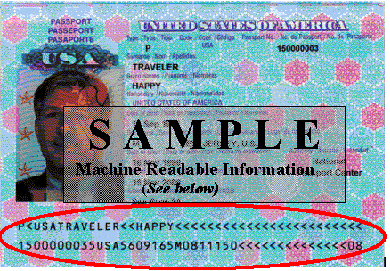
Sample Obtained from Wikipedia
<li style="list-style-type: none;">
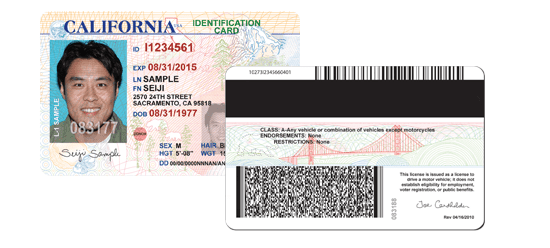
<li><strong>Presence of 2D barcode</strong>. California's driver's license has a 2D barcode printed on the back of the card, which contains the bearer's identification details. When the barcode is properly decoded, the scanning result is almost always-accurate.</li>
<li><strong>Quality of printed text or the font type used</strong>. If there is a rubber stamp or signature on top of printed text, it will deteriorate OCR accuracy. Not all font types are created equal. Some font types - such as OCR_A and OCR_B are specifically optimised for OCR, and thus, speeds-up the OCR speed and accuracy. Some font types do not present a vast distinction between O and 0, I and 1, and will impact the accuracy rate. Font size matters too - text with a larger font size is easier to be recognised at a higher accuracy rate.</li>

<li><strong>Consistency of the content layout</strong>. The more consistent a card layout is, the better it is for OCR. Some IDs created in the pre-digital computerisation era are not printed with a 100% consistent layout.</li>

<li><strong>Presence of marker</strong>. In some cases, the word "Address:" always precedes street address. This serves as a consistent marker for OCR engine to recognise and interpret street addresses.</li>

<li><strong>Language</strong>. English content comprises Latin/Roman alphabets, and it's one of the easier finite sets of alphabets or symbols to be recognised by OCR. Chinese characters, on the other hand, are far more complex.</li>
Singapore National Identity Card (IC) doesn’t have an embedded chip. However, the card’s printed layout is of high quality and consistent. Besides the ID number, there are only full name, race, date of birth, gender (M or F), and country of birth clearly printed on the front side. Singapore IC OCR can be performed at a very high accuracy rate
When considering OCR, there are 2 types of processors available:
<li><strong>Server-side:</strong> The traditional processing method in OCR technology. If server-side OCR is applied to ID input from a mobile channel, it is done at the expense of user experience. Each time a photo is captured and submitted from the mobile channel to the server-side OCR engine, the user has to wait for the upload to be completed. Once the server side responds with the OCR result, and if the result isn’t satisfying, the image capture and upload process has to be reiterated again.</li>

<li><strong>Client-side:</strong> If OCR is fully rendered on the client side, such as within the iOS/Android platform, the user experience is more seamless.</li>
While smart card reading promises retrieval of always-accurate data, OCR may not – especially when the OCR scanning is relying on the recognition of printed text instead of MRZ/2D barcode, and when scanning is performed from today’s modern channels – i.e. mobile device camera.
Besides, it is also easier to forge an ID card on a printed surface than a smart card or chip. Smart cards may contain security features and even PKI. However, when the speed of data entry and minimising human errors are the primary objectives, OCR is definitely a very good option when smart card reading isn’t possible. At the same time, you may experience failure in reading a smart card if there is a manufacturing defect or the chip is simply damaged over time due to negligence.
With these methods in mind, companies can now tailor Photo ID collection techniques to suit their target demographic.
It is possible to combine these approaches to have a more secure onboarding experience at the expense of user experience. Generally, it is best to consult with an expert to build an optimised workflow. Drop us an e-mail today, or visit our wiki-page to learn more information!
Related articles
Spotting Fake IDs: How Hologram Tech Keeps Online Sign-Ups Safe

Fraud Prevention Best Practices: Staying Ahead in the Digital Age
Fraud has evolved into one of the most pressing challenges for businesses in the digital age, specifically in industries where trust and identity verification are critical, such as banking, insurance, telecommunications, and e-commerce. Fraudsters are after one thing, and one thing only: your perso

Fraud Prevention in the Digital Age: How AI is Transforming the Fight Against Scams
The onset of the digital age has ushered in remarkable innovations that we never would have thought possible a decade ago. Everything, from the way we work to the way we live our daily lives, has been drastically streamlined by technological advances. However, this progress comes with a double edge